 Ppijuk
A free Windows Sticky Notes alternative that keeps your desktop tidy
Looking for a Windows Sticky Notes alternative that does not scatter note windows all over your desktop? Ppijuk is a free sticky notes app for Windows 10 and 11 that docks every note to the right edge of the screen, stacks them from top to bottom, and folds them into a thin strip when you are not using them.
How Ppijuk is different
Instead of free-floating windows you drag around, every Ppijuk note docks to the right edge of the screen. Several notes stack from the top down without overlapping, and dragging one only changes its place in the stack. Nothing ever sits in the middle of your work.
When you are not using a note, it folds into a strip just 16 pixels wide. Move the pointer to the edge and it turns into a vertical tab showing the note’s name and how many to-dos are left. Click the tab to open the note; when you are done, it folds away again.
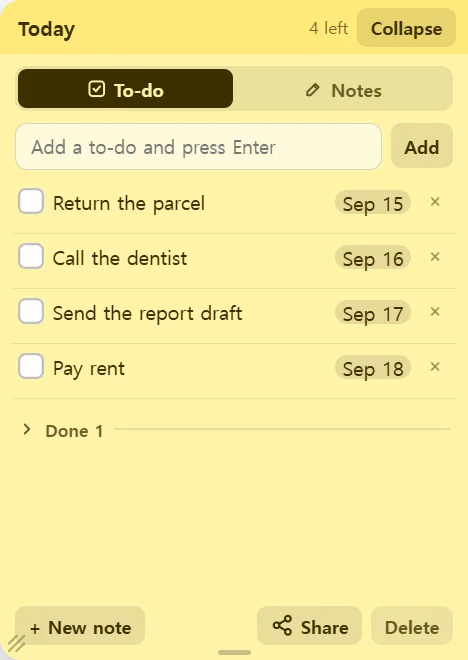
Each note has two modes: a To-do checklist and free-form Notes. In Notes mode you can use bold, italic, underline, highlight, text color and text size, and any web address you type becomes a clickable link.
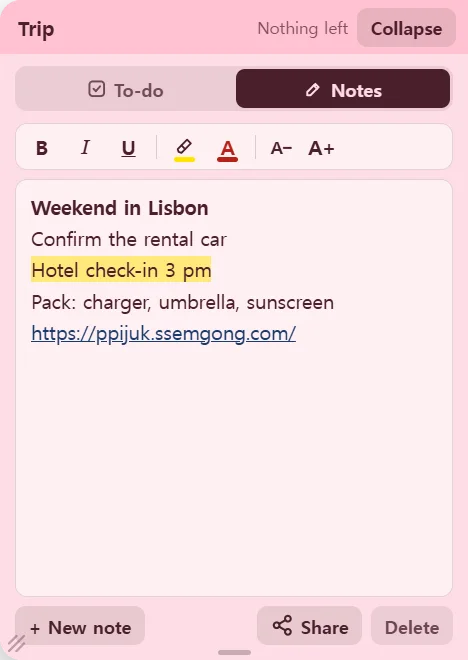
A notepad that is always one move away
A text file has to be found and opened before you can read it. Ppijuk sits on the edge of your screen all the time, so you can jot a thought down the moment you have it. Everything saves as you type, so there is no Save button.
Prefer not to install anything? There is a portable build that runs without installation, and a web version at ppijuk.ssemgong.com/app that runs in the browser.
Get started in a couple of minutes
- Download the installer (ppijuk-setup.exe) and run it. Choose English or Korean during setup. The app starts right away and adds a desktop shortcut.
- Move the pointer to the right edge of the screen and click the tab to open your first note.
- Click the note’s name to rename it, and right-click the note to pick one of seven colors.
- Type a to-do and press Enter, or switch to Notes mode for longer text.
- To have Ppijuk open every time Windows starts, turn on “Start with Windows” in the tray icon menu. The same menu has “Language / 언어” if you want to switch languages later.
Frequently asked questions
Does it run on Windows 10 and Windows 11?
Yes, on both. You can use the installer or the portable build, which runs without installing. There is no Mac desktop app; on a Mac, open the web version at ppijuk.ssemgong.com/app in your browser.
Can I import my existing Windows Sticky Notes?
There is no automatic import. Copy the text of each note and paste it into a Ppijuk note in Notes mode.
Is the app available in English?
Yes. The installer lets you choose English or Korean, and you can switch at any time from the tray icon menu under “Language / 언어”.
What if I delete a note by mistake?
Deleting happens right away, without a confirmation box, but the note goes to Trash first. Right-click any note and open Trash to restore deleted notes and to-dos within 30 days.
Get Ppijuk free
The Windows 10/11 installer, the Android app and the web version are all free.