 Ppijuk
A free to-do list app for Android and the web
Looking for a free to-do list app for Android? Ppijuk runs as an Android app from Google Play and as a web app at ppijuk.ssemgong.com/app for iPhone and other devices. You write to-dos as checklists, see them on a monthly calendar, and after one Google sign-in you get the same list as on your PC.
What you can do in the app
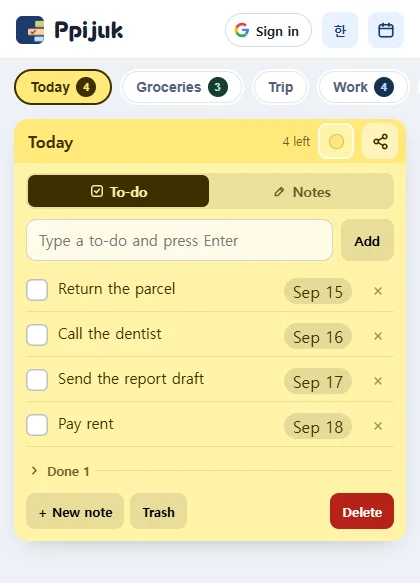
Pick a note from the row of tabs at the top and add to-dos to it. Type a task and press Enter or tap the add button; the keyboard stays open so you can keep going.
Tick a task and it folds away at the bottom, leaving only what is left to do. Every to-do carries the date you added it as a badge; tap the badge to set a due date.
Tap the calendar button in the top bar to open a monthly calendar. Colored dots show which days are busy, tapping a date lists that day’s to-dos below, and “+ To-do” adds one to that date.
Notes and sharing
Switch a note to Notes mode and it becomes a free-form notepad instead of a checklist.
Tap the share icon in a note’s header. In the Android app this opens your phone’s share sheet; in the web version it copies the link. The person you send it to can open the note in a browser without installing anything.
Get started
- On Android, install Ppijuk from Google Play.
- On an iPhone or any other device, open ppijuk.ssemgong.com/app in your browser.
- Tap “Continue with Google” to see the same to-dos as Ppijuk on your PC. If you skip sign-in, your to-dos are saved on that device only.
- Add your first to-do. Today’s date is attached automatically; tap the date badge to change it to a due date.
Frequently asked questions
Is there an iPhone app?
No. There is no iPhone app. On an iPhone, open the web version at ppijuk.ssemgong.com/app in Safari or any other browser.
Will my phone remind me when something is due?
No. The Android app and the web version do not send reminders. Reminders come only from the Windows app’s desktop calendar.
Can I use the app in my own language?
Yes, if it is English or Korean. The Android app and the web version follow your device’s language: Korean on a Korean-language device, English everywhere else. The language button in the top bar switches between the two.
Is Ppijuk really free?
Yes. The Android app, the web version, the Windows installer and the portable build are all free, and so is syncing between them. There is no paid plan.
Get Ppijuk free
The Windows 10/11 installer, the Android app and the web version are all free.